A few years ago, I was using Pinterest to drive free traffic for Google AdSense. I was doing what most people do: testing random stuff, posting content, hoping something would stick. But I never actually knew what was working because Pinterest hides all the important data from you.
The Problem I Faced
Here's the thing about Pinterest: when you're scrolling through your feed, you see pins, but you don't see any engagement data. No likes, no saves, no repin counts, no comments, nothing. All that data is hidden.
If you want to see how a pin is performing, you have to click on it individually. Then you might find how many saves it got, how many comments, etc. Now imagine doing that for 100 pins. That's your whole day gone just clicking around trying to figure out what content actually works.
I couldn't find what was actually performing well in my niche. I was basically guessing, and that's not a strategy.
The Idea
Fast forward to recently. I've been vibe coding a lot, building tools to solve problems I face. I've always loved making browser extensions - I built Word Counter and other tools before. So I thought: why not build something that shows me Pinterest stats while I'm scrolling?
I benchmarked existing solutions, did my research, and started building. The goal was simple: show all the hidden engagement data directly on the pins as you browse, without having to click on each one.
What SortPins Does
SortPins is now a fully working browser extension for Chrome and Firefox. Here's what it actually does:
Overlay Stats While Browsing
As you scroll Pinterest, you see everything directly on the pins:
- Likes, comments, shares, and repins count
- When the pin was posted (6 months ago, 2 days ago, etc.)
- Content type (image, video)
- Whether it's AI-generated or original content
No more clicking on each pin individually. You see it all at a glance.
Pin Analyzer Dashboard
The extension comes with a dashboard where you can analyze all your collected pins. You can view videos, images, repins, original pins, and AI-detected content in separate organized tabs.
Auto-Save Feature
There's an auto-save option that automatically saves pins to your local storage as you browse. You don't have to do anything - just scroll and the extension collects pins with great stats in the background.
Advanced Sorting & Filtering
In the dashboard, you can sort pins by most likes, most saves, most comments, most shares. Filter by date, content type, or engagement levels. You can finally see what's actually working instead of guessing.
CSV Export
Export all your data to CSV. Export only videos, only images, only AI-generated content, only bookmarked pins - whatever you need. You can use that CSV to re-import pins, analyze trends, or build reports.
One-Click Downloads
Download any image or video directly from Pinterest with one click. The site also has a free Pinterest Downloader that gets used daily by people worldwide.
The Results
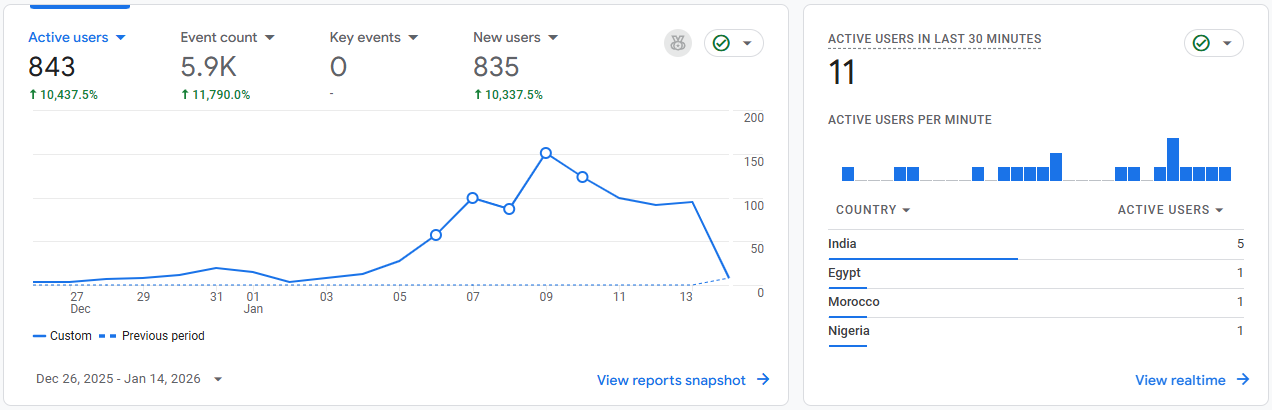
The tool launched and started getting real traction. Within the first two weeks after launch:
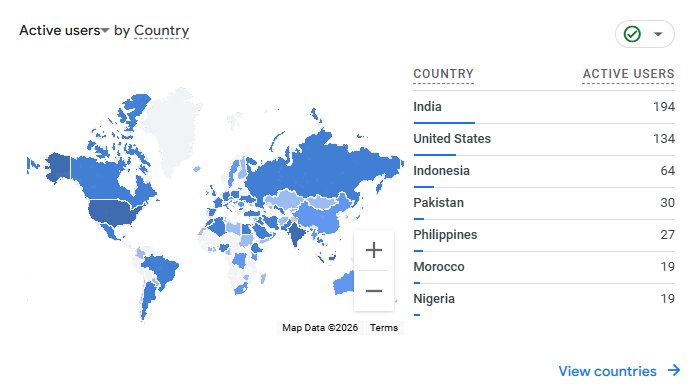
- 843 active users
- 10,400%+ increase in traffic
- Users from all over the world
Good SEO from day one. The Pinterest Downloader alone drives consistent daily traffic from people searching for ways to download Pinterest content.
Why I Built It This Way
I've always believed in solving problems I actually have. When you build something you need yourself, you understand every pain point. You know exactly what features matter and what's just noise.
The extension stores everything locally. Your data stays on your device. No complicated accounts, no servers storing your Pinterest activity. It just works.
What's Next
SortPins is still evolving based on user feedback. The core is solid - see hidden stats, collect pins, analyze data, export everything. But there's always room to make it better.
If you're serious about Pinterest marketing or just want to understand what content actually performs, check out SortPins. There's a free version to try it out.
For more stories about building products, check out how I built Mockup Script and the Word Counter Extension.